
Migration to AWS from your own data centre, Azure, OCI or Google Cloud. We move applications, data and servers with a controlled deployment.
Migration to Amazon Web Services (AWS) starts with an inventory
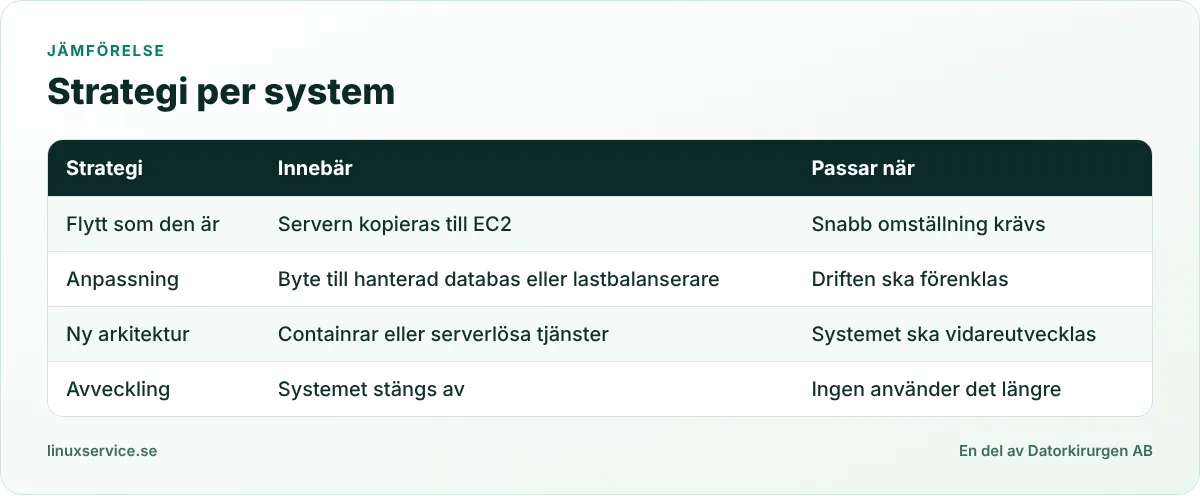
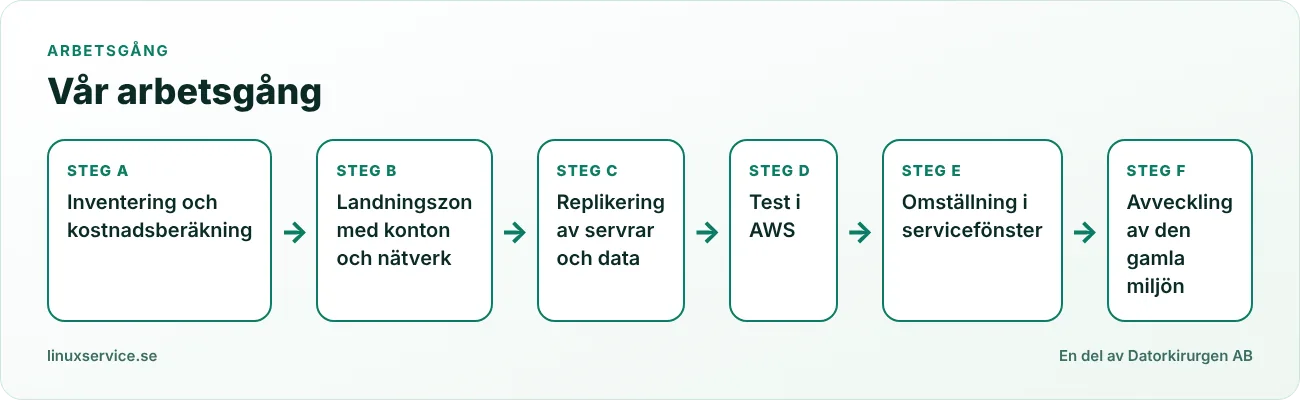
However, a migration to AWS is about more than copying servers. First, we map which applications, databases and integrations exist, and how they depend on each other. After that, we decide for each system whether we move it as it is, adapt it or replace it with a managed service. This applies regardless of whether the systems are in your own data centre, with Microsoft Azure, in Oracle Cloud Infrastructure or in Google Cloud.
In addition, the inventory gives a basis for the cost. We compare today’s operation with an estimated monthly cost in AWS, including storage, network traffic and backups. At the same time, many businesses discover servers that nobody uses any more, and we therefore do not need to move them at all. As a result, both the project and the future operation become smaller.
The tools we use for migration to AWS
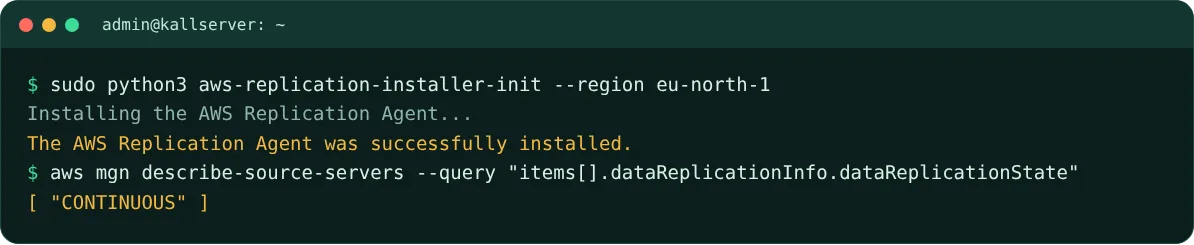
For servers, we primarily use AWS Application Migration Service. In fact, the service replicates the disks continuously from the source server to AWS, regardless of whether the source is physical, virtual or another cloud provider. During the replication, the source continues to work as usual. We then start test instances in AWS, check them and carry out the cutover only when everything works. The service costs nothing for the first 90 days per server, which is enough for most projects.
Databases, on the other hand, we move with AWS Database Migration Service, which can keep the source and the target synchronised until the cutover. At the same time, we move files and object storage with DataSync or with our own scripts. Read more in our article on database migration.
From Azure, Oracle and Google Cloud to AWS
A move from another cloud provider, however, has its own details. For example, Linux servers in Azure often run a kernel adapted for Azure, and we need to replace it with a generic kernel before the replication starts. From Oracle Cloud Infrastructure, we often move Oracle databases, and then we choose between Amazon RDS for Oracle, our own installation on EC2 or Oracle Database@AWS. From Google Cloud, we mainly move servers, databases and object storage.
In addition, since 2024 AWS, Azure and Google offer free outbound data transfer for customers who leave them. From 12 January 2027, the EU Data Act completely bans fees for switching cloud provider. Therefore, lock-in through transfer fees has decreased, and a migration to AWS becomes both cheaper and easier to plan. Information about the regulation is available from the European Commission.
Security and the landing zone in AWS
Before we move anything, we build a landing zone. Among other things, this means separate accounts for production and test, networks with clear zones, central logging and permissions according to the principle of least privilege. We also activate CloudTrail, GuardDuty and alerts for unusual sign-ins. This foundation means that security is in place from the first day, instead of arriving afterwards.
In addition, we follow the same routine as in all our assignments: a backup, a dry run and a check before every change. The cutover itself happens in a planned maintenance window, and the old environment remains until you have approved the result. As a result, we can always go back if something unexpected happens.
After the migration: cost and operation
After the cutover, we follow up the cost during the first few months. Often you can reduce it further with the right instance size, reserved capacity or storage that moves rarely used data to cheaper classes. In addition, we set up monitoring with CloudWatch and alerts that actually mean something. Feel free to read about how we work with CPU credits and CloudWatch.
Contact Linux Service about migration to AWS
Linux Service is part of Datorkirurgen AB and has more than 30 years of experience of servers, databases and operation. We carry out migration to AWS from your own data centre and from other cloud providers for businesses across Sweden. Prices start from €1,300 per hour excluding VAT, and before every project you receive a clear plan and estimate.
Frequently asked questions about migration to AWS
Questions about migration to AWS
- What does a migration to AWS involve?
- Can you move servers from our own data centre?
- Can you also move from Microsoft Azure to AWS?
- Can you move from Oracle Cloud Infrastructure to AWS?
- Does the move also work from Google Cloud?
- Which tools do you use when you move servers?
- What is AWS Application Migration Service?
- How long does a migration take?
- Will there be an interruption when we switch?
- Can we go back if something goes wrong afterwards?
Cost, security and rules
- Does it become cheaper in AWS?
- What does outbound data transfer cost when we switch provider?
- How does the EU Data Act affect a switch of cloud?
- What is a landing zone?
- How do you protect the systems during the move?
- Can the data remain in Sweden even in the cloud?
- How do you handle licences for Windows and Oracle?
- Can you move Oracle databases to AWS?
- How do you follow up the cost afterwards?
- Can you reduce the cost in an existing AWS environment?
Operation and cooperation
- Do you take care of operation after the move?
- Do you work with both Linux and Windows?
- Can you move websites and WordPress?
- What do you do with email and files?
- How do you test before the cutover?
- Do you work remotely?
- Do you come on site in Stockholm?
- How quickly can you start?
- What does your help cost?
- Can you help us choose a cloud provider before we decide?