
Bash scripts that automate backups, reports and operation on Linux. We write, review and troubleshoot scripts for businesses in Stockholm and across Sweden.
Why scripts pay off
Every time an engineer does the same thing by hand, there is a risk of error. A command ends up in the wrong order, a file is forgotten or a check is skipped. With well-written Bash scripts, the computer does the work in exactly the same way every time. This saves time, but above all it gives predictability. Therefore, almost all our operations assignments start with us looking at what can be automated.
Typical examples are database backups, cleaning up old logs and checking certificates. Other clients want a daily report on disk space and updates. A script can also move files between systems or import data from a supplier. In short, Bash suits everything that involves files, commands and scheduled tasks. For more advanced logic, however, we choose Python instead.
How we write robust scripts
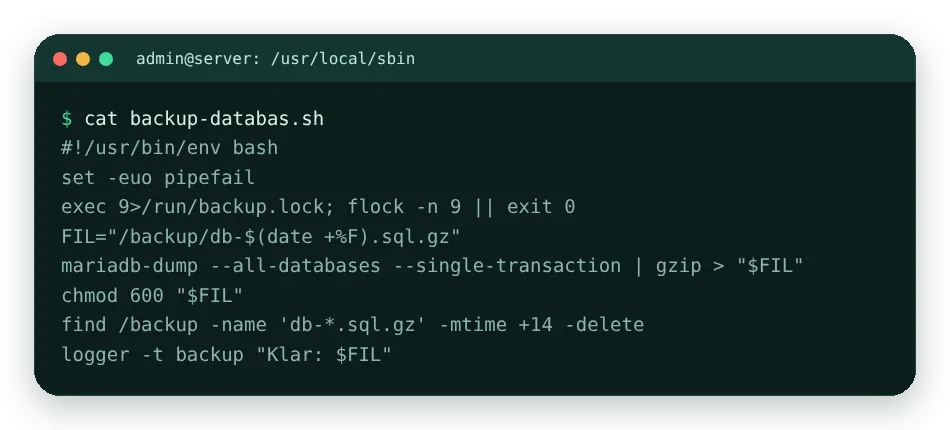
A script that works on the test server does not necessarily work in production. Therefore, we follow a fixed template. Every script starts with set -euo pipefail, so that it stops at the first error instead of carrying on blindly. In addition, we put quotation marks around all variables, since file names with spaces otherwise cause problems. We also lock the script with flock, so that two runs do not collide.
We log everything the script does to the system log. As a result, when something goes wrong, we can see exactly when and why. We never put sensitive details such as passwords in the script itself. Instead, they sit in a separate file with strict permissions, or in a key manager. Finally, we run every script through ShellCheck, which finds common mistakes before they reach the server.

Scheduling with cron and systemd
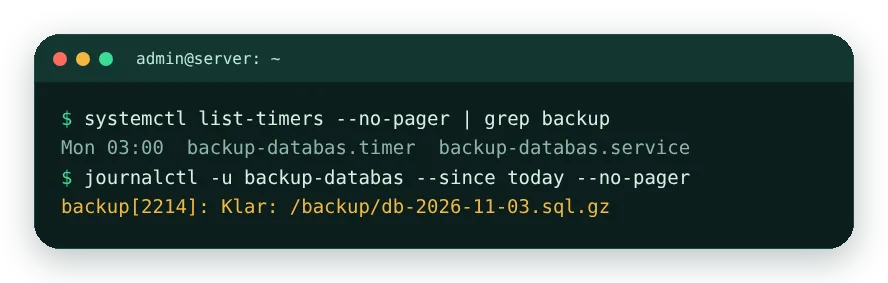
When the script is ready, it must run at the right time. The classic tool is cron, which exists on all Linux systems. We put our jobs in separate files under /etc/cron.d, so that they are traceable. For more demanding jobs, however, we use systemd timers. They give better logging, and in addition they can run a missed job when the server starts again.
For example, we have a clean-up script on our own web servers that runs on the first and the fifteenth of every month. It removes old logs, temporary files and cache. Before we introduced it, the disk on one server filled up, and then the websites stopped responding. Today that problem is gone. More about it in the article on disk space, journald and swap.
Troubleshooting existing scripts
Many clients have scripts that someone wrote a long time ago. They worked once, but after an update they stopped working. Often this is because a command has changed its behaviour or a path has moved. We read the script line by line and run it in debug mode with bash -x. In this way, we see exactly where it goes wrong.
After that, we fix the fault and modernise the script where needed. We add error handling, logging and comments. As a result, the script becomes both more stable and easier to maintain for the next engineer. Sometimes it turns out that several scripts do almost the same thing. In that case, we merge them into one, which simplifies operation further.

Security and permissions
A script that runs as root can do great damage if it contains an error. Therefore, we let scripts run with the lowest possible permissions. If a script only needs to read a directory, it gets its own account with exactly that permission. In addition, we check that no other user can change the script file. Otherwise, an attacker could insert their own commands that run with high permissions.
We are also careful with data that comes from outside. We check file names, form data and responses from other systems before the script uses them, because that is the most common path for attacks on scripts. More about file permissions in Linux in our separate article.
Contact Linux Service about Bash scripts
Linux Service is part of Datorkirurgen AB and has written scripts for Linux for more than 30 years. We write new scripts, review existing ones and troubleshoot those that have stopped working. The official manual is the GNU Bash Reference Manual, but we are happy to take care of the work.
Therefore, contact us and describe which task you want to automate. We propose a solution and give a time estimate. We work remotely across Sweden. Moreover, you always receive the scripts with comments and a short description.
Frequently asked questions about Bash scripts
Questions about Bash scripts
- What is a Bash script?
- When is Bash a better choice than Python?
- What does set -euo pipefail do?
- Why should variables have quotation marks?
- What does flock do in a script?
- How do you log from a script?
- Where should passwords be kept if the script needs them?
- What is ShellCheck?
- Can you write scripts that run on all Linux distributions?
- How do you test a script safely?
Bash scripts: scheduling and troubleshooting
- How do you schedule a script with cron?
- What is a systemd timer?
- Why are systemd timers better than cron in some cases?
- Can you design scheduled tasks that run automatically?
- What does bash -x do?
- Why do old scripts stop working after an update?
- How do you find the fault in a long script?
- Can you combine and merge JSON and PHP scripts?
- How do you document a script?
- How do you avoid two runs colliding?
More about security and assignments
- Why should scripts not run as root?
- How do you protect the script file against changes?
- How do you check data that comes from outside?
- Can you review our existing scripts?
- Can you write scripts for backups?
- Do you also write scripts for reports?
- Do you work remotely?
- How long does it take to write a normal script?
- What does a script cost?
- How do I contact you about a script?