
PostgreSQL on Linux for businesses: installation, vacuum, indexes, backups and upgrades between versions. We help you in Stockholm and across Sweden.
When PostgreSQL is the right choice
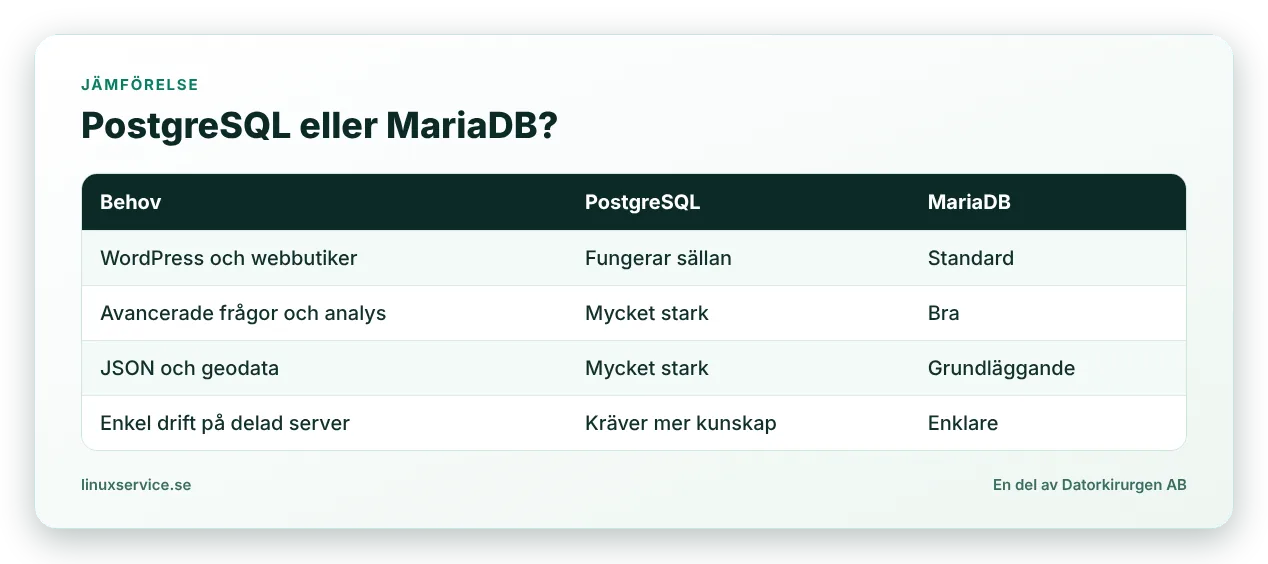
PostgreSQL is one of the most advanced free databases. It handles complex queries, large amounts of data and advanced data types such as JSON and geographic data. Therefore, many developers choose it for new systems and analysis tools. Moreover, PostgreSQL on Linux is well proven, since most large installations run exactly there. We work with the database on Debian, Ubuntu, AlmaLinux and in the cloud.
A new major version comes roughly once a year, and each version receives updates for five years. Version 19 was released in November 2026 and, among other things, adds the REPACK command, which reclaims space in tables without blocking reads and writes. We usually install from the PostgreSQL project’s own package repositories. In that way, we get the version we want, instead of the one the distribution happens to include. In addition, it gives better control during upgrades. At the same time, several versions can exist on the same server during a transition period, which makes the move between versions considerably safer.
Installation and basic settings
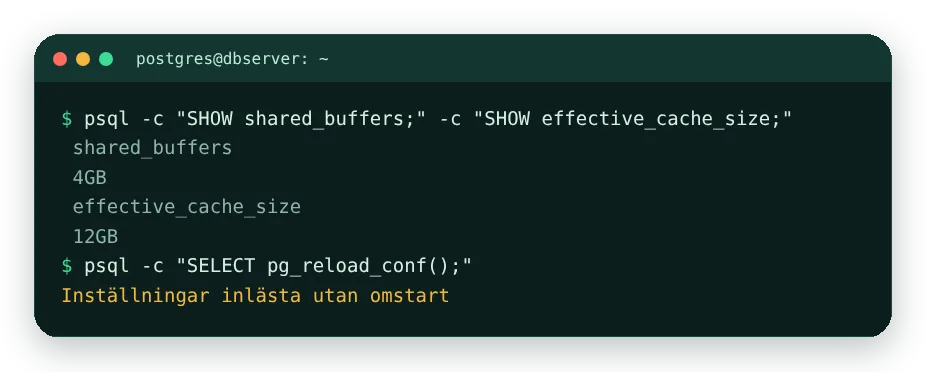
After the installation, we set up the memory. We often set shared_buffers to a quarter of the server’s memory, and effective_cache_size to roughly three quarters. In addition, we adjust work_mem, which controls the memory for sorting and joins. However, a value that is too high can cause problems when many queries run at the same time. Therefore, we choose values according to the real load.
The file pg_hba.conf controls access. There we decide which users may connect, from which addresses and with which method. We always use encrypted passwords with scram-sha-256. The database only listens on the addresses that are needed, and as a result it is not visible to the internet. Moreover, each program gets its own role with restricted permissions.
Vacuum and autovacuum
PostgreSQL writes new versions of rows instead of changing them in place. Old versions remain until vacuum cleans them up. If the clean-up cannot keep up, the tables grow, and then the queries become slower. Autovacuum handles this automatically, but the default settings do not always suit large tables. Therefore, we adjust the thresholds for the tables that change the most.
We follow up with the views pg_stat_user_tables and pg_stat_activity. There we see when vacuum last ran and whether something blocks it. For example, a transaction that has been open for several hours can prevent all clean-up. We find and fix such problems before they affect the users. It is one of the most common reasons why a PostgreSQL database becomes slow over time.

Slow queries and indexes
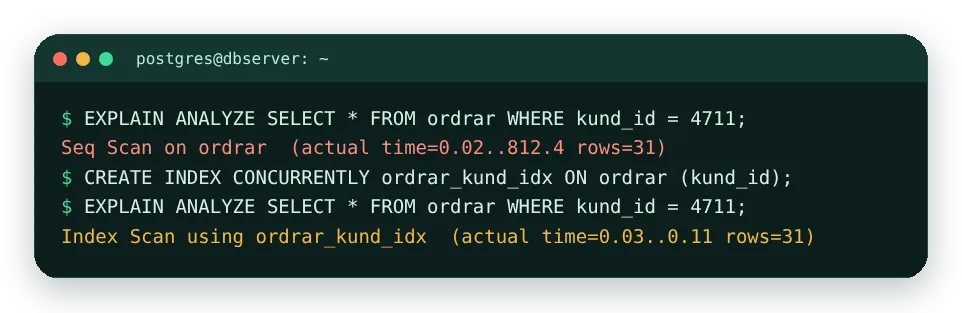
The extension pg_stat_statements collects statistics about all queries. There we see which queries take the most time in total, and that is usually where the improvement lies. With EXPLAIN ANALYZE, we see how the database actually runs a query. If it reads the whole table when it only needs a few rows, an index is often missing. In that case, we add the right index and measure again.
We also look for indexes that are never used, because they take up space and make writes slower. In addition, if you have many connections from a web application, PgBouncer can help, since it reuses connections. The result is a database that handles more traffic on the same hardware. See also MariaDB on Linux if you have both databases.
Backups and upgrades
For backups, we use pg_dump for individual databases and pg_basebackup or pgBackRest for whole clusters. Moreover, with continuous archiving of the transaction log, we can restore to an exact point in time. That is invaluable if someone accidentally deletes data in the middle of the day. We test the restore regularly, just as with all other backups.
We carry out upgrades between major versions with pg_upgrade, which is fast even for large databases. First, we test on a copy and check that all extensions exist in the new version. After that, we carry out the upgrade in a maintenance window. Finally, we run ANALYZE, so that the database gets new statistics immediately. During the first few days, we also follow the performance extra closely, since the query plans sometimes change with a new version.
Contact Linux Service about PostgreSQL on Linux
Linux Service is part of Datorkirurgen AB and has more than 30 years of experience of Linux and databases. We install, optimise and upgrade PostgreSQL on Linux for businesses across Sweden. Official information is available in the PostgreSQL documentation.
Therefore, contact us when the database has become slow or when an upgrade is approaching. We carry out a review and propose actions. We work remotely, and you always receive a short report. Moreover, we can take over the ongoing operation.
Frequently asked questions about PostgreSQL on Linux
Questions about PostgreSQL on Linux
- When should you choose PostgreSQL instead of MariaDB?
- How long does a major version receive updates?
- Which version should we use?
- Why install from the project’s own package repositories?
- Does WordPress work with PostgreSQL?
- Does PostgreSQL handle JSON and geodata?
- How large can a database become?
- Can PostgreSQL run in the cloud?
- What is a role in PostgreSQL?
- How do you see which version is running?
PostgreSQL: settings and maintenance
- What does shared_buffers do?
- How large should effective_cache_size be?
- Why can a high work_mem cause problems?
- What does pg_hba.conf control?
- Why should you use scram-sha-256?
- What is vacuum?
- Why can autovacuum not keep up?
- How do you find transactions that are left open?
- What does pg_stat_statements show?
- What does EXPLAIN ANALYZE do?
More about backups and upgrades
- What is the difference between pg_dump and pg_basebackup?
- Can you restore to an exact point in time?
- What is pgBackRest?
- How do you upgrade with pg_upgrade?
- Why should you run ANALYZE after the upgrade?
- What does PgBouncer do?
- Can you take over the operation of our database?
- Do you work remotely?
- What does your help cost?
- How do I contact you about PostgreSQL?