
File permissions in Linux control who can read and change the web files. This is how we set owners, 755 and 644 and protect wp-config.php on a web server.
Why permissions matter so much
Many problems with WordPress and other web applications concern file permissions in Linux. If the web server cannot write in the right directory, updates and uploads do not work. If, on the other hand, it can write everywhere, an attacker who gets in can change any file. In other words, the right permissions are a balance between function and security. Therefore, we go through them when we take over a server.
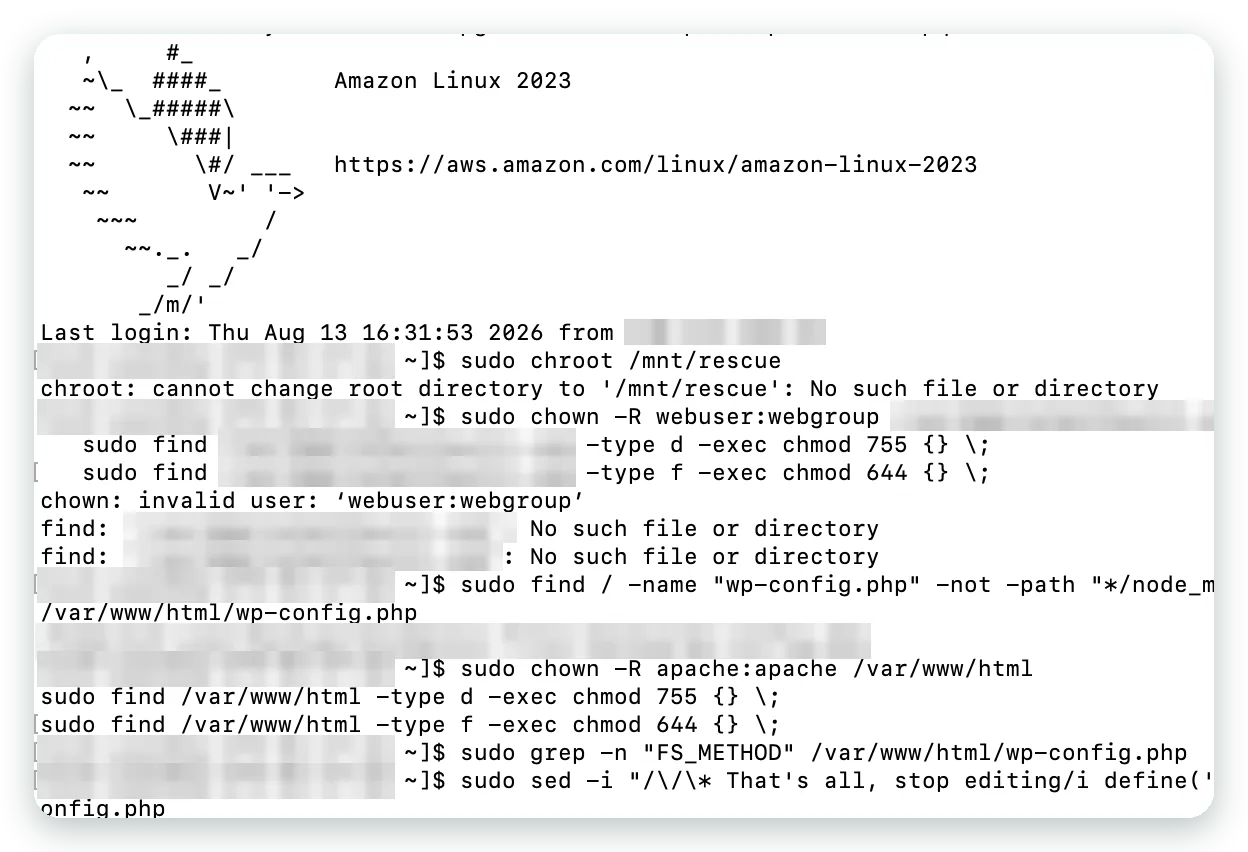
In addition, every file in Linux has an owner, a group and three sets of permissions. They state what the owner, the group and everyone else may do. For example, the number 755 on a directory means that the owner may do everything, while others may read and open the directory. The number 644 on a file means that the owner may read and write, and others may only read. It sounds technical, but the principle is clear.
A real fault: the wrong user for the web server
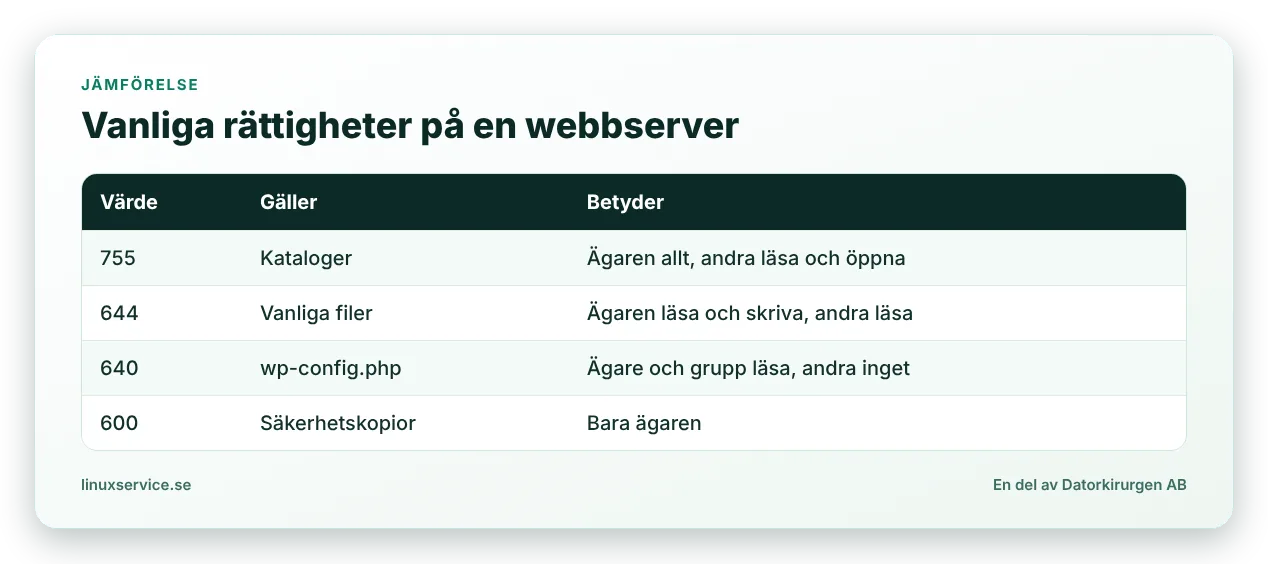
The screenshot in the article comes from a server where we corrected the ownership. An older command from another environment tried to set the owner to webuser:webgroup, but that user did not exist. The command failed with the error invalid user, since the user was missing. In fact, on Amazon Linux and the Red Hat family, the web server’s user is called apache. On Debian and Ubuntu, it is instead called www-data.
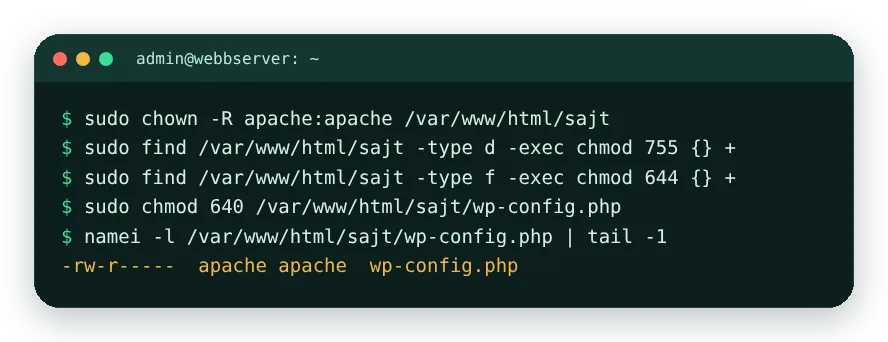
Once we had the right user name, we set the owner on the whole web directory. After that, we set 755 on all directories and 644 on all files with find. It is a safe baseline for most sites. Finally, we gave the configuration file stricter permissions, since it contains the database password. After that, the website worked as it should.
The right baseline for WordPress
For WordPress, we recommend that the web server’s user owns the files if the site should update itself from the admin panel. The alternative is that a separate user owns the files and that updates happen with WP-CLI. It is more secure, but at the same time it requires more work. We choose the model according to how you want to work. The important thing is that the choice is deliberate and documented.
The wp-config.php file gets permission 640 or 600. The upload directory gets write permission, but PHP files there must never run. This stops a common attack where someone uploads a malicious file and then calls it. We add the rule in Apache, so that it applies even if someone changes something in WordPress. Read more about WP-CLI for safe updates.
Troubleshooting when something does not work
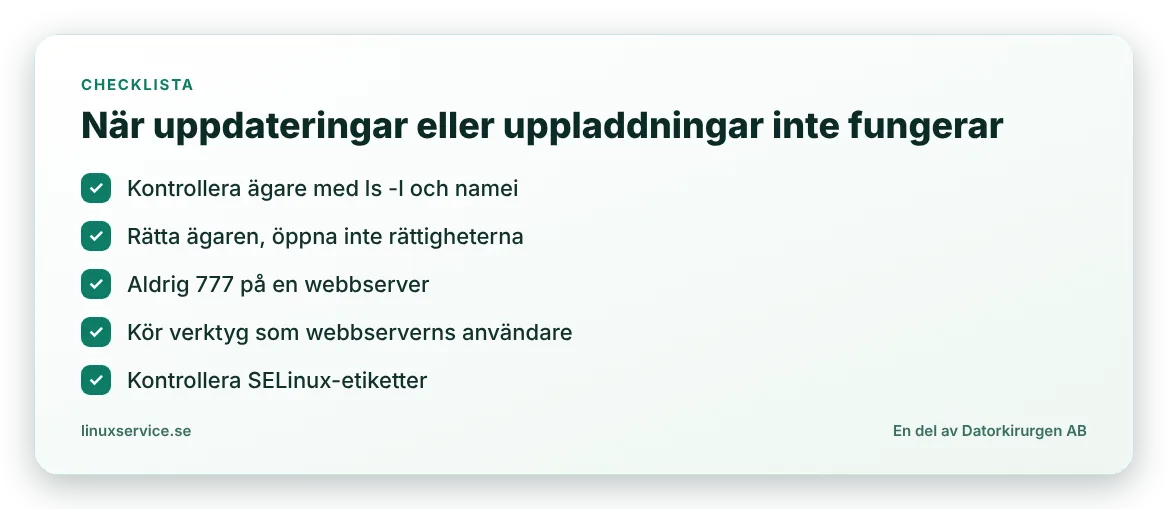
When WordPress asks for FTP details during an update, it often means that the web server cannot write in the directory. The solution is then the right owner, not opening the permissions for everyone. Unfortunately, we sometimes see sites where everything has 777. This means that anyone on the server can change the files, and therefore it is very dangerous. We fix such things immediately.
Another common problem arises when the wrong user creates files. If an administrator runs a script as root, new files get root as their owner. Then the web server can no longer change them. Therefore, we always run WP-CLI and similar tools as the web server’s user with sudo -u apache. In this way, the ownership is right from the start.
SELinux: the extra level
On the Red Hat family and Amazon Linux, SELinux can also play a part. Even if the permissions are right, SELinux can deny the web server writing if the file has the wrong label. For example, this often shows after someone has moved files from another directory. We check the label with ls -Z and correct it with restorecon. We never switch off SELinux to solve such a problem.
For directories where the web server should write, we set a special label. As a result, it may write exactly there, but nowhere else. This gives strong protection even if an attacker were to get in via a vulnerable site. Read more about the protection in the article on hardening Linux.
Contact Linux Service about file permissions in Linux
Linux Service is part of Datorkirurgen AB and operates web servers with Apache, PHP and WordPress across Sweden. We correct ownership and permissions, and in addition we make sure that updates work securely. WordPress describes its recommendations in the documentation on file permissions.
Therefore, contact us if WordPress asks for FTP details or if uploads do not work. We carry out a review and fix the faults remotely. You always receive a short summary of what we have changed.
Frequently asked questions about file permissions in Linux
Questions about file permissions in Linux
- What do the numbers 755 and 644 mean?
- What is the difference between owner, group and others?
- Which user runs the web server on Amazon Linux?
- Which user runs the web server on Ubuntu?
- Why did we get the error invalid user?
- What does chown do?
- What does chmod do?
- Why do you use find to set permissions?
- What is the difference between permissions on files and directories?
- How do you see the permissions of a file?
File permissions in Linux for WordPress
- Who should own the WordPress files?
- Which permissions should wp-config.php have?
- Why does WordPress ask for FTP details?
- Why is 777 dangerous?
- How do you stop PHP files in the upload directory?
- Why should WP-CLI run as the web server’s user?
- What happens if root creates files?
- How does namei -l work?
- What does FS_METHOD mean in WordPress?
- How do you protect backups on the server?
More about SELinux and support
- How does SELinux affect the permissions?
- What does ls -Z show?
- What does restorecon do?
- Why should you not switch off SELinux?
- How do you give the web server write permission in a directory?
- Can you go through the permissions on our server?
- Can you fix a site that has 777?
- Do you work remotely?
- What does your help cost?
- How do I contact you about permissions?