
0:00
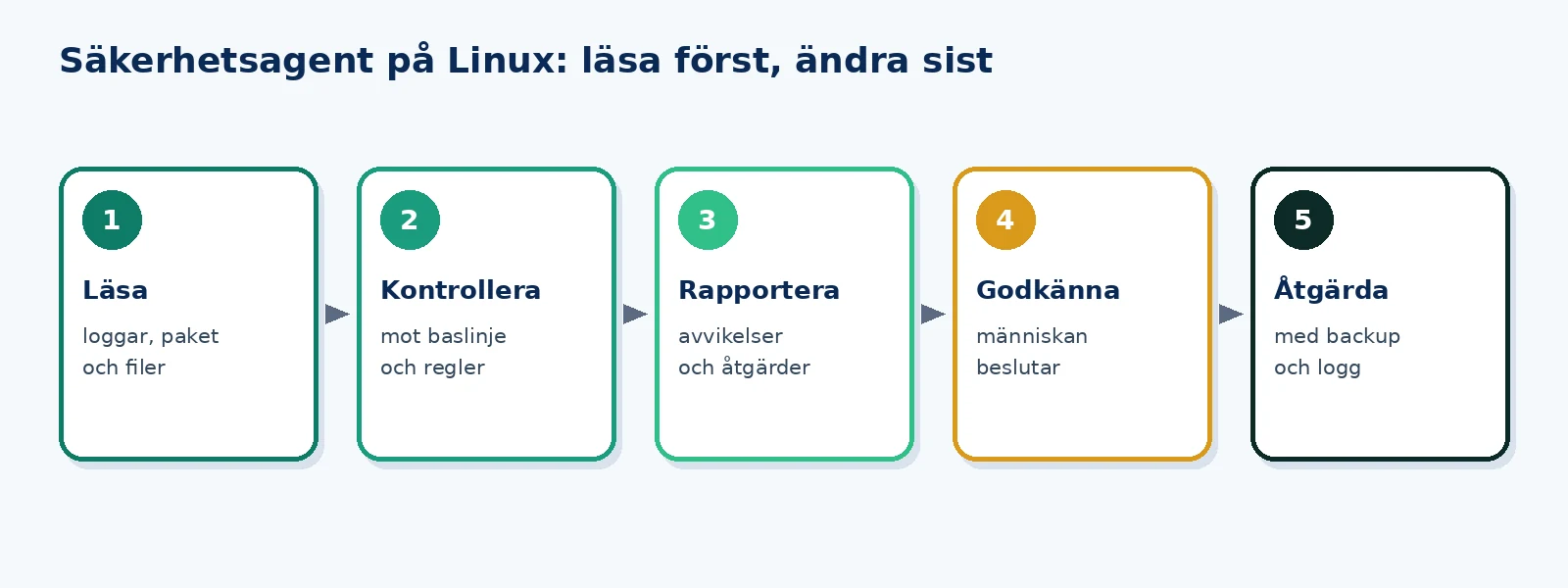
Security agents for Linux do the work that administrators rarely have time for: they read logs, check updates, compare files and settings with an approved baseline and report what deviates. Linux Service, part of Datorkirurgen AB, develops such agents for servers running Amazon Linux, Oracle Linux, Red Hat, Debian and Ubuntu, and we build them to read first and change last.
Why security agents for Linux?
A Linux server can run for years without anyone looking at it. Meanwhile, the pile of security updates, new user accounts, changed permissions and failed logins that nobody reviews keeps growing. That is why many companies discover an intrusion only after the damage is done.
A security agent changes that. The agent starts on a schedule, for example every night, and compares the state of the server with how it should look. Consequently, you receive a short report on everything that differs from the previous run, instead of relying on someone remembering to check.
Monitoring logs and logins
First, the agent reads the logs. With journalctl, auditd and the web server logs, it finds repeated failed SSH logins, new sudo users, unusual processes and requests to sensitive addresses on the website. In addition, it can check that fail2ban or the firewall actually blocks the addresses that attack.
Therefore, the agent does not send every line, but collects the events and weighs them. A single failed password is normal, but a hundred attempts from the same network in one minute is not. In this way, the report is readable even for a management team.
Checking updates and integrity
Next, the agent checks the updates. On Amazon Linux, Red Hat and Oracle Linux it lists pending security updates with dnf, and on Debian and Ubuntu with apt. Furthermore, it checks the versions of OpenSSH, PHP, MariaDB and the web server, so you can see which services need an upgrade.
In addition, the agent can monitor file integrity with AIDE or with its own checksums. If someone changes a configuration file, adds a file to the web root or replaces a system program, it shows up in the next report. Above all, this reveals back doors that attackers like to leave behind after an intrusion.
Reviewing configuration and permissions
In fact, a large part of security lies in the settings. The agent therefore reviews the SSH configuration, which users have sudo, file permissions in the web root, open ports and which services start automatically. It also compares them with a baseline, such as the CIS benchmarks or your own security policy.
When something deviates, the agent proposes an action, but it does not carry it out on its own. Instead, it shows exactly which line it wants to change and why. As a result, the administrator can make the decision in seconds, with full understanding of what will happen.
How we build secure security agents
At the same time, an agent with access to the server is itself a target for attackers. That is why we build it with the least possible privilege: it reads with its own account, and only the steps that really require root use sudo. Furthermore, it stores no passwords or keys in plain text, and it sends reports encrypted.
Every agent also has the same three safeguards: a dry run first, explicit approval before any change and a log of everything it does. We write the agents in Bash and Python, test them against a copy of the environment and document them so that your own staff can read and review the code. More about how we work with Bash scripts and automation and deployment with dry runs.
Contact Datorkirurgen AB about security agents for Linux
Linux Service, part of Datorkirurgen AB, has more than 30 years of experience with Unix and Linux, including from the defence industry and the telecom sector. We develop security agents for servers in AWS, Oracle Cloud, Azure, Google Cloud and private data centres.
Our services start from €1,300 per hour excluding VAT, and we are happy to offer a fixed price for a well-defined assignment. The Center for Internet Security publishes guidelines for secure Linux configuration on cisecurity.org. Contact us via the form on our home page, and we will go through what a security agent should monitor in your environment.
Frequently asked questions about security agents for Linux
Security agents for Linux and monitoring
- What does a security agent do on a Linux server?
- How often should the agent start?
- Which logs does the agent read?
- Can the agent detect attacks against SSH?
- Does the agent work together with fail2ban?
- Can the agent monitor several servers at once?
- Which Linux distributions do you support?
- Does the agent work in AWS and Oracle Cloud?
- How do we receive the reports?
- Can the agent alert immediately on serious events?
Updates, integrity and configuration
- How does the agent check security updates?
- Can the agent update the server automatically?
- What is AIDE?
- How does the agent detect changed system files?
- Can the agent find back doors in the web root?
- How does the agent review the SSH configuration?
- What are the CIS benchmarks?
- Can the agent check open ports?
- Can the agent review who has sudo?
- How does the agent compare against a baseline?
Security, price and cooperation
- How do you protect the agent itself against attackers?
- Which permissions does the agent get?
- Why does the agent require approval before changes?
- What is a dry run?
- Does the agent keep logs of everything it does?
- Can our own staff review the code?
- Can you adapt the agent to our security policy?
- Do you provide support after delivery?
- What does a security agent cost?
- How do we get started?