
Oracle Linux with the UEK kernel and Ksplice: how we install, migrate servers from CentOS and operate Oracle Linux for businesses across Sweden.
What distinguishes Oracle Linux from other RHEL clones
Oracle Linux is compatible with Red Hat Enterprise Linux, but it has a few qualities of its own. The most important is the choice of kernel. You can run the same kernel as RHEL, or you can choose Oracle’s own Unbreakable Enterprise Kernel, called UEK. UEK follows newer versions of the Linux kernel, and therefore the server often gets better support for new hardware and newer features. In addition, the system is free to download and use, even in production.
You only buy support if you want it. Moreover, a support agreement gives access to Ksplice, which can install security fixes in the kernel without a restart. For systems that must run around the clock, this is a great advantage. Many people use the system together with Oracle’s databases, but it works just as well for web servers and other services. We help you choose the right kernel and the right support level. In fact, many only need support on the most critical servers, while test and development environments manage without it.
UEK or RHCK: which kernel should you choose?
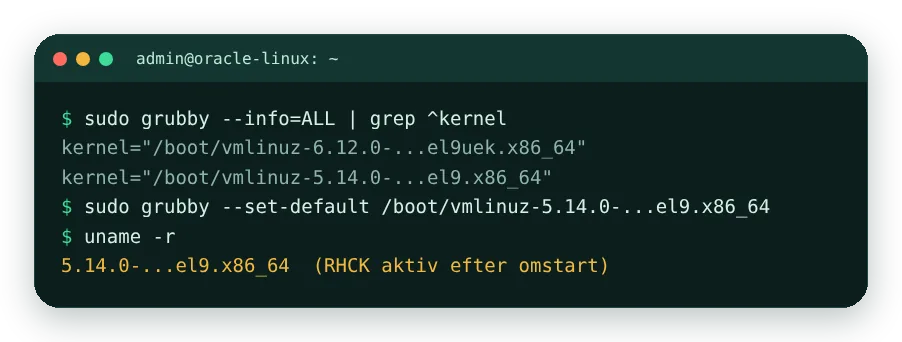
The choice between UEK and the RHEL-compatible kernel, RHCK, depends on what the server should do. UEK is the default on new installations and suits most people. However, if you have third-party programs that are only certified for RHCK, we choose that one. For example, this applies to certain security programs and drivers. You can make the switch afterwards, since both kernels can be installed at the same time.
We set which kernel should start with grubby. We always do it in a planned maintenance window, since the server must restart. After that, we restart and check with uname -r. If something does not work, we can therefore choose the other kernel at the next start. It is a safe model, and it lets us test a new kernel without risk. In this way, even larger updates become manageable. In addition, we note which kernel each server runs in your operations documentation. When a new vulnerability becomes known, we then know immediately which servers it affects, and we can prioritise correctly.
Migration from CentOS to Oracle Linux
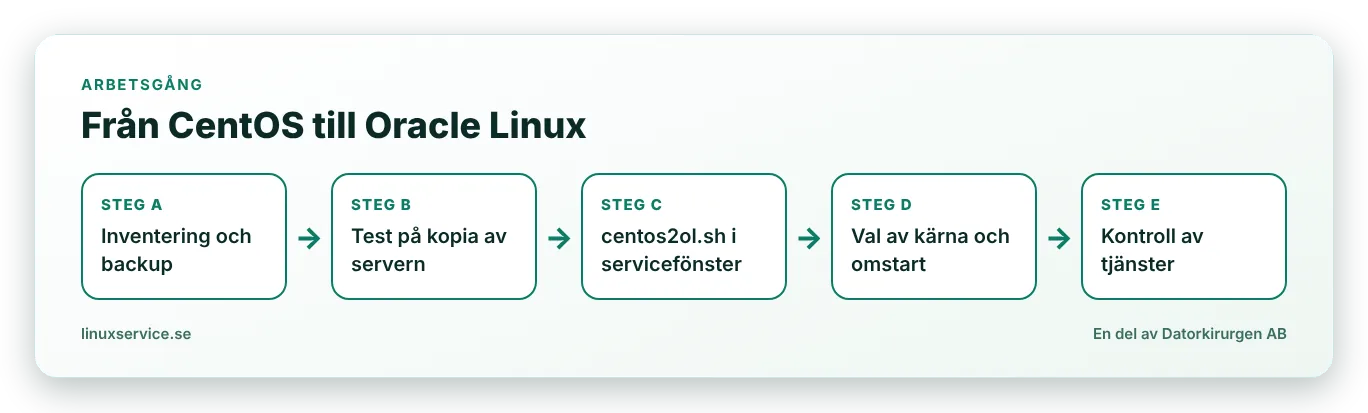
Oracle offers the centos2ol.sh script, which switches a CentOS server to Oracle Linux in place. The script changes the package sources and replaces the packages that differ. The programs remain, and as a result you avoid a new installation. It works well on servers that do not have too many special packages. We always take a full backup first, and after that we test on a copy of the server.
On older servers, it may be wiser to install Oracle Linux from scratch and move the services there. This applies especially if the server has control panels, custom kernel modules or very old program versions. Therefore, we make an assessment case by case. Often the inventory shows that some services are already unused, and then we can remove them in connection with the move. Feel free to also read about AlmaLinux, which is another option for those leaving CentOS.
In the cloud and together with databases
The distribution is ready to use in Oracle Cloud Infrastructure, but it runs just as well in AWS or Azure. In addition, Oracle’s cloud includes support at no extra cost. Many of our clients use the system for Oracle Database, since Oracle tests the database against its own distribution. Then it is natural to gather everything with one supplier.
We set up the server according to the requirements of the database, for example memory, huge pages and the disk scheduler. Oracle also provides a preinstallation package that does much of this automatically. Even so, we check the result, since default values do not always suit a real environment. In addition, we measure performance before and after, so that you see what the changes achieved. When it comes to troubleshooting the database itself, our sister site Business IT Support has a separate article.
Contact Linux Service about Oracle Linux
Linux Service is part of Datorkirurgen AB and has worked with Linux and Oracle’s platforms for more than 30 years. We install and operate Oracle Linux, choose the kernel according to your needs and migrate old CentOS servers. Official information is available on Oracle’s pages about Oracle Linux.
Therefore, contact us when you plan a migration or when a server shows operational disruptions. We carry out a quick review and propose a plan with a time estimate. We work remotely or on site in Stockholm. Moreover, we can take over the ongoing patching, with or without Ksplice.
Frequently asked questions about UEK, Ksplice and migration
Questions about Oracle Linux
- Is Oracle Linux free to use?
- What is UEK?
- How does the system differ from Red Hat Enterprise Linux?
- What is RHCK?
- Do you need Ksplice?
- Do we need a support agreement with Oracle?
- Can Oracle Linux run in AWS and Azure?
- Does Oracle Cloud Infrastructure include support?
- Does the system suit environments without Oracle Database?
- How long does a version have support?
Oracle Linux: kernel and migration
- How do you switch between UEK and RHCK?
- Can both kernels be installed at the same time?
- When should you choose RHCK instead of UEK?
- What does the centos2ol.sh script do?
- Do the programs remain after the migration?
- When is a new installation better?
- How long does a migration take?
- Can we test the migration before the real server?
- What happens to custom kernel modules?
- How do you go back if something goes wrong?
More about databases and support
- What does the preinstallation package for Oracle Database do?
- Why should you set up huge pages?
- How does the disk scheduler affect the database?
- Can you also troubleshoot Oracle Database?
- Can you take over the patching of our servers?
- Do you work with Oracle Cloud Infrastructure?
- Do you work remotely or on site?
- What does a migration cost?
- How quickly can you help with urgent faults?
- How do I contact you about Oracle Linux?