
Linux Mint gives older computers new life when Windows 11 cannot be installed. We install, move data and provide support in Stockholm and across Sweden.
When Windows 10 no longer receives updates
Microsoft stopped releasing security updates for Windows 10 in October 2025. Many computers still work well, but they do not meet the requirements for Windows 11. Therefore, many businesses and private individuals face a choice. They can buy new computers, or they can give the old ones a new operating system. Linux Mint is often the best alternative, since the interface resembles Windows and feels familiar from the first day.
Linux Mint is based on Ubuntu LTS, and as a result the system receives security updates for several years. In addition, there is a version based directly on Debian, for those who want even more stability. The system is free, and it requires no licence per computer. For a smaller office, it can therefore save both money and electronic waste. At the same time, it reduces the risk that an insecure, outdated computer poses to the network.
Which edition suits you?
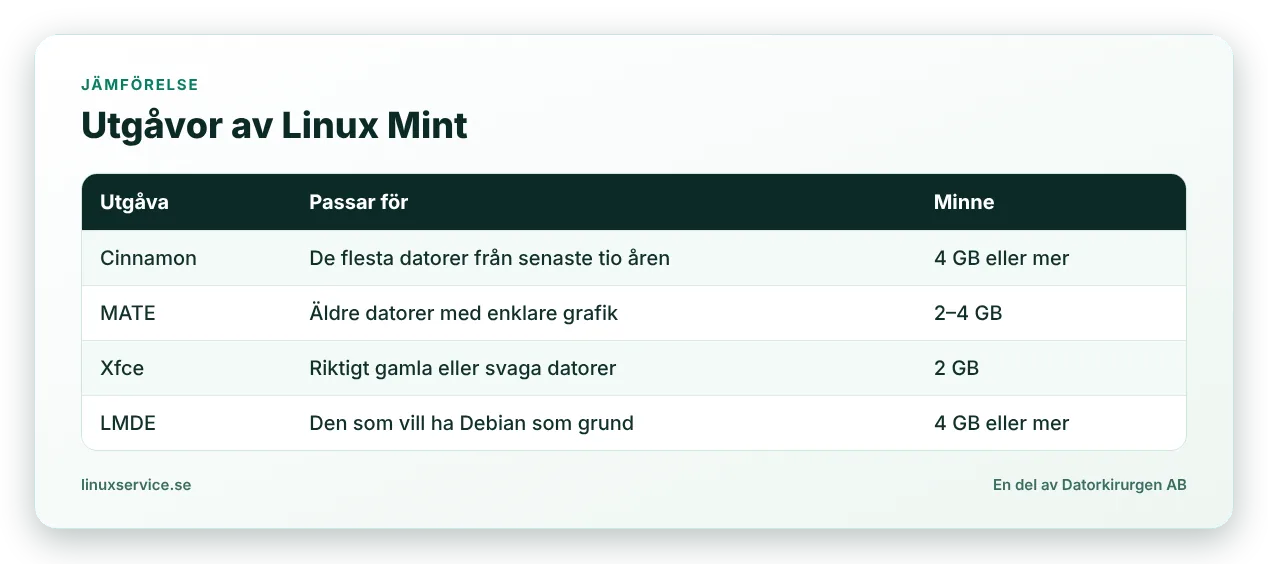
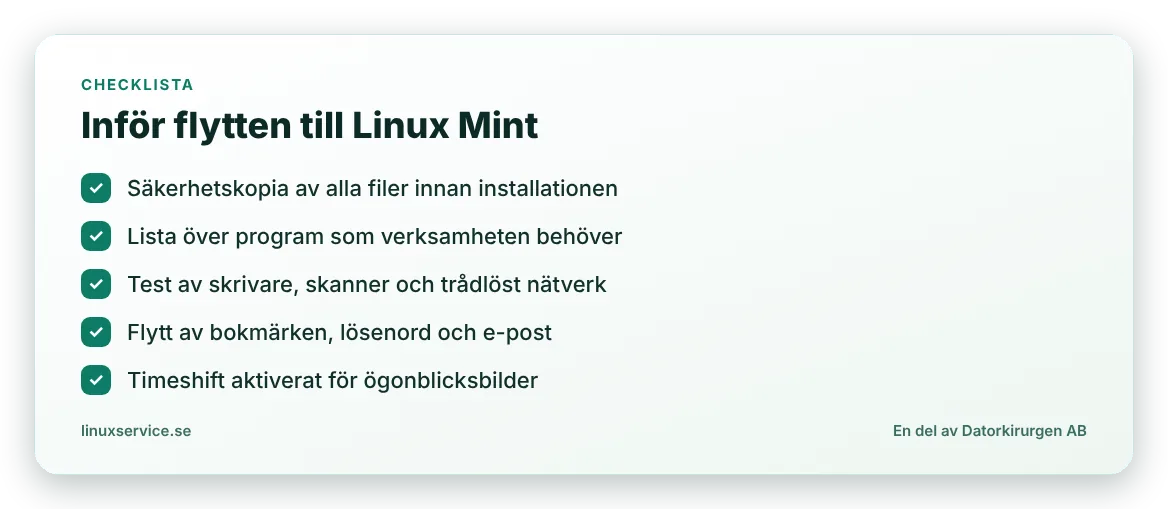
Linux Mint is available with three desktop environments. Cinnamon is the main edition, and it suits most computers that are at most ten years old. MATE needs somewhat fewer resources, while Xfce suits really old machines with little memory. We choose the edition according to the computer’s processor, memory and the user’s habits. In addition, we test graphics, sound, printers and wireless networking before we hand over the computer.
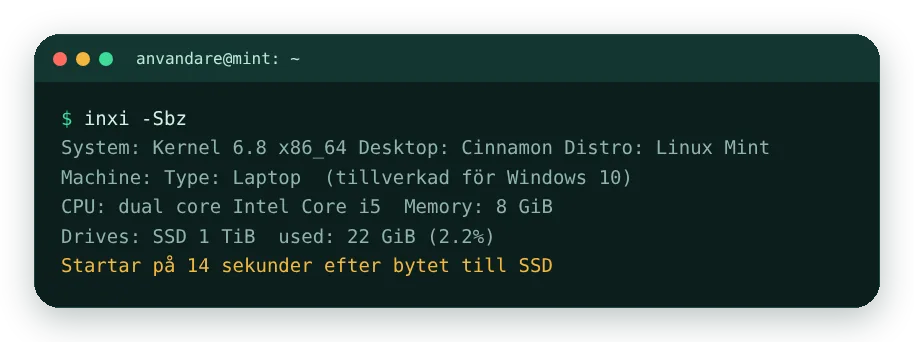
A fast SSD often makes a bigger difference than a new system. Therefore, when we install Linux Mint, we like to replace an old hard drive with an SSD at the same time. In this way, the computer starts in a few seconds, and the programs open without waiting. The cost is low compared with a new computer. We also give an introduction, so that the user feels confident from the start. Moreover, we show where the programs are and how to install more via the software manager.
Moving files, email and programs
The hardest part of a switch is rarely the installation itself. Instead, it is about files, bookmarks, email and habits. Therefore, we move documents, pictures and browser profiles from the old installation. In addition, Thunderbird can take over the email, and Firefox or Chrome work exactly as before. For Microsoft 365, the user works in the web version, which works well for most people.
Some Windows programs lack a Linux version. For those, we first look for a good alternative, for example LibreOffice or GIMP. If the program is essential, it can sometimes run via Wine, but we always test this before we promise anything. We tell you honestly if something does not work. In fact, it is better to know before the switch than after. Sometimes the solution is that a single computer keeps Windows, while the rest of the office moves to Linux.
Security and maintenance in daily use
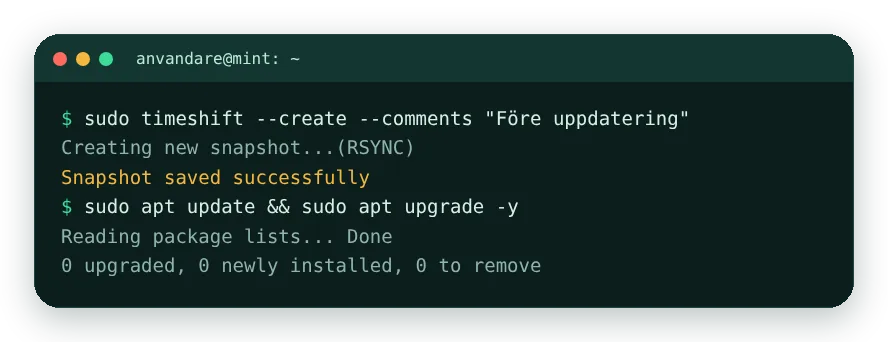
Linux Mint has its own update manager that shows what to install. We set it up so that security updates arrive automatically. In addition, we activate Timeshift, which takes snapshots of the system. If an update causes problems, the user can therefore go back to yesterday’s state with a few clicks. We also switch on the firewall, even if the computer sits behind a router.
Viruses are much rarer on Linux than on Windows, but no system is completely secure. Therefore, we add a password prompt on wake-up and an encrypted home directory on laptops. In addition, the user gets an ordinary account without administrator rights for daily use. With these basic settings, a computer with Linux Mint lasts for many years. We also show how to print, connect to Wi-Fi and find files. If you also need help with Ubuntu Server, we have an article on that.
Contact Linux Service about Linux Mint
Linux Service is part of Datorkirurgen AB and has more than 30 years of experience of Linux. We install Linux Mint on business computers, move data and provide support afterwards. We do the work in our workshop in Stockholm or at your premises, and after that we can help remotely. More about the system is available on the Linux Mint website.
Therefore, contact us before you buy new computers. We are happy to make a quick assessment of which computers can handle the switch. Often an SSD and a new installation are enough, and then you can use the computers for several more years. You also receive a short quick guide that shows how the system works. If something feels unfamiliar after the switch, call us, and we will help directly via remote control.
Frequently asked questions about Linux Mint
Questions about Linux Mint
- Is Linux Mint free for businesses too?
- Which foundation is the system based on?
- How long does a version receive updates?
- Which edition suits a ten-year-old computer?
- Can the system replace Windows 10 in the office?
- How much memory do you need?
- Does Microsoft 365 work in the browser?
- Can you run Windows programs with Wine?
- What is LMDE?
- Do you need antivirus on Linux?
Linux Mint: installation and moving
- How long does an installation take?
- Can you switch to an SSD at the same time?
- How do you move files from Windows?
- Do bookmarks and passwords come along?
- Does our printer work with Linux?
- How do you move the email to Thunderbird?
- Can we test the system before we switch?
- What does Timeshift do?
- How do you go back after a failed update?
- Can Windows and Linux exist on the same computer?
More about security and support
- How do you set up automatic updates?
- Should you encrypt the home directory on a laptop?
- Why should the user not be an administrator?
- Does the firewall need to be on behind a router?
- Do you help remotely after the installation?
- Do you come to our home or to the office?
- How many computers can you take at once?
- What does an installation cost with you?
- Can you also take care of old computers for recycling?
- How do I contact you about Linux Mint?