
Container migration to AWS, Azure, OCI and Google Cloud. Run applications in containers without managing servers, with ECS, EKS, AKS, OKE and GKE.
What container migration involves
A container migration means that we package the application with everything it needs and run it on a platform that manages the servers for you. As a result, you avoid installing, updating and monitoring operating systems for each application. In addition, the platform starts more containers when the load increases and fewer when it decreases. Consequently, you only pay for the capacity that the application actually uses.
Basically, there are two main paths. The first is to move an existing application from an ordinary server to containers. The second, on the other hand, is to move existing containers from one platform to another, for example from Amazon EKS to Azure Kubernetes Service or from Azure to Oracle. Linux Service works with both, in every direction.
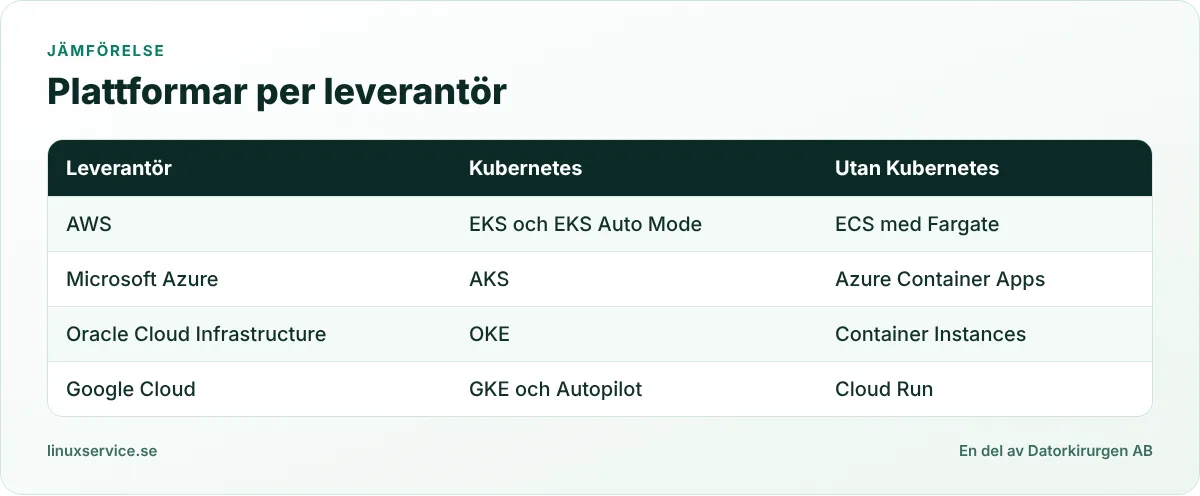
Container migration with or without Kubernetes
Kubernetes is certainly the standard for containers, but it is still not always the right choice. For a few services, a simpler platform is often enough, for example ECS with Fargate, Azure Container Apps or Cloud Run. There are no nodes to manage at all. Kubernetes, on the other hand, fits better when you have many services, need advanced network handling or want to be able to move between providers.
At Amazon Web Services (AWS), EKS Auto Mode is now the recommended choice for new Kubernetes environments. In addition, the mode follows Kubernetes in full, and AWS manages the nodes. This makes the platform easier to operate than a classic installation, while you keep the option to move to AKS, OKE or GKE later. A smaller business with a few services, however, often manages without Kubernetes, and then both operation and cost become lower. We help you choose the level that suits your organisation and your budget.
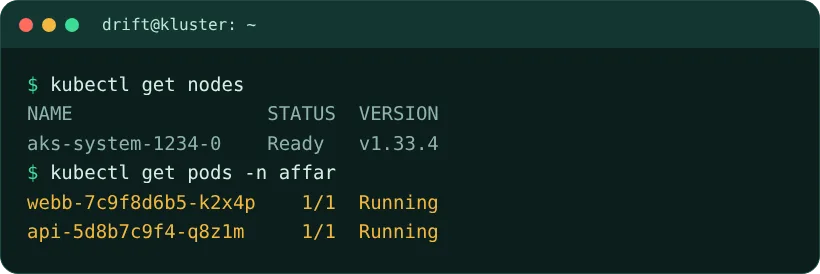
From server to container
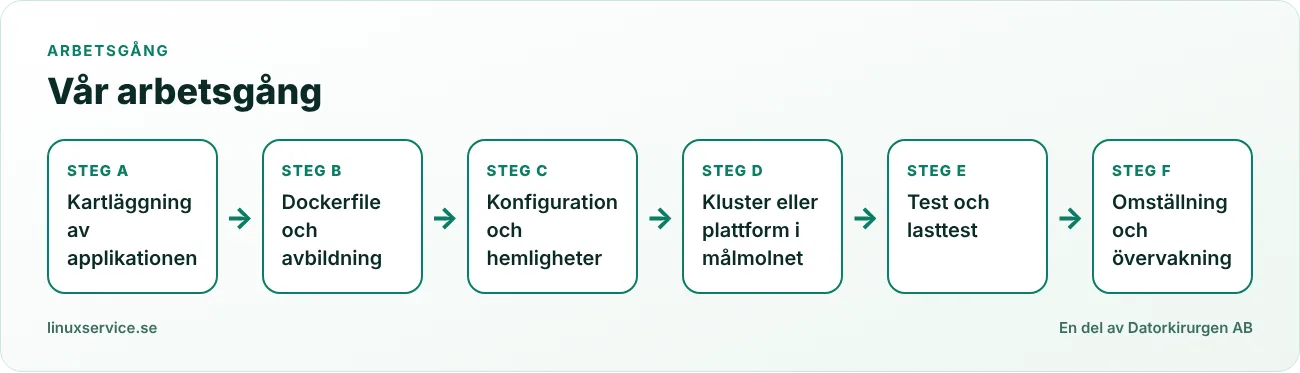
Therefore, moving an application from a server to containers requires preparation. First, we map what the application needs: files, configuration, secrets, scheduled jobs and connections to databases. After that, we write a Dockerfile and move configuration and secrets to the platform’s own solutions. We move data that the application needs to keep to a managed database or to object storage, since containers should not store data themselves.
We then build an automated pipeline that builds, tests and deploys new versions. As a result, every update becomes traceable and easy to roll back. Also read about how we work with Java on Linux and Python on Linux, which are often the applications we move.
Moving containers between clouds
When the containers already exist, a move between clouds is often easier than for ordinary servers. Kubernetes works in the same way at all providers. The differences lie in storage, load balancers, permissions and image registries. Therefore, we use tools such as Velero to move resources and volumes, and we rewrite the parts that are tied to a particular provider. More about Kubernetes is available in the official Kubernetes documentation.

Security in container environments
At the same time, containers require their own security. For example, we scan images for vulnerabilities, run containers without root privileges and restrict the network traffic between the services. In addition, we log all changes in the cluster, so that you can investigate an intrusion afterwards. Read more about hardening Linux servers.
Contact Linux Service about container migration
Linux Service is part of Datorkirurgen AB and carries out container migration for businesses across Sweden. We work with ECS, EKS, AKS, OKE, GKE and Cloud Run. Prices start from €1,300 per hour excluding VAT.
Frequently asked questions about container migration
Questions about container migration
- What is a container migration?
- How does a container differ from a server?
- Do we need Kubernetes?
- What is ECS with Fargate?
- When does EKS Auto Mode fit?
- What is AKS?
- How does OKE work in Oracle Cloud Infrastructure?
- What are GKE and Cloud Run?
- Can you move from EKS to AKS?
- Can you also move from AKS to OKE?
Applications and data
- Can all applications run in containers?
- How do you move an application from a server?
- Where is data stored in a container environment?
- How do you handle passwords and secrets?
- Can you move Java applications?
- Does it also work with PHP and WordPress?
- Can you move Python services?
- How do you update the applications afterwards?
- How do you protect the containers?
- Can we go back if something goes wrong?
Cost, operation and contact
- Does it become cheaper with containers?
- What does a Kubernetes cluster cost?
- Do you take care of operation afterwards?
- Do you monitor the cluster?
- How long does a container migration take?
- Do you work remotely?
- Do you come on site in Stockholm?
- How quickly can you start?
- What does your help cost?
- Can you help us choose a platform before we decide?