
Azure Linux is Microsoft’s own distribution, formerly CBL-Mariner. This is how we use it in AKS and operate Linux servers in Azure for businesses across Sweden.
From CBL-Mariner to Azure Linux
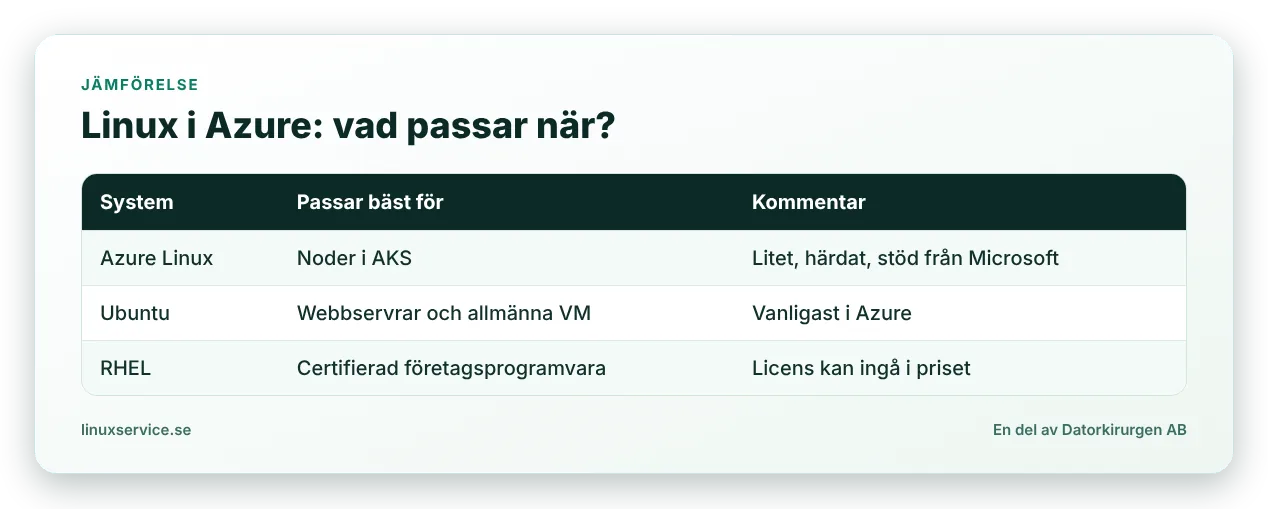
Few people know that Microsoft actually has its own Linux distribution. It used to be called CBL-Mariner and ran internally in Azure, but today it has a new name. Version 3.0 became generally available in 2024, with a new long-term kernel and updated packages. The system is small and stripped down, since above all it should work as a host for containers. Therefore, the system fits best in Azure Kubernetes Service, abbreviated AKS.
The distribution uses RPM packages and the tdnf package manager, which resembles dnf. The security settings are strict from the start, and there are ready-made images that meet FIPS. At the same time, the system lacks much of what you expect on an ordinary server. In other words, it is not a desktop system, nor a direct alternative to Ubuntu on a web server. We help you decide when it fits. Often the answer is a combination, where the cluster runs Azure Linux while databases and older programs stay on Ubuntu or RHEL. The important thing is that each system has a clear task and a responsible person who manages it.
The distribution in Azure Kubernetes Service
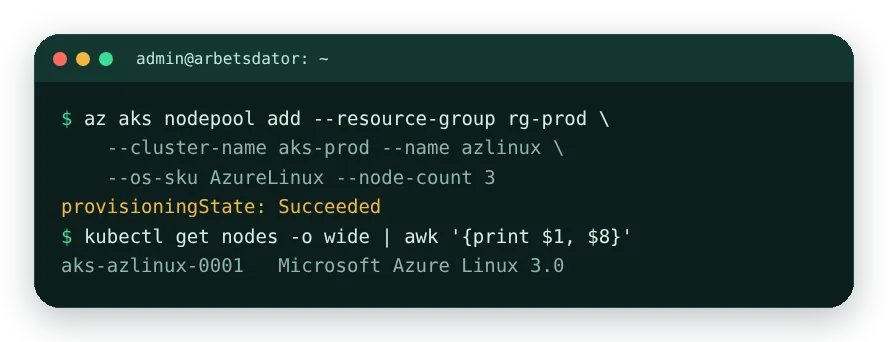
In AKS, you choose the operating system for each node pool. With the --os-sku AzureLinux parameter, the nodes get Azure Linux instead of Ubuntu. The advantage is a faster start, a smaller attack surface and also a system that Microsoft itself is responsible for. In addition, in many cases you can switch existing node pools from Ubuntu without rebuilding the cluster. We always test the switch in a separate node pool first.
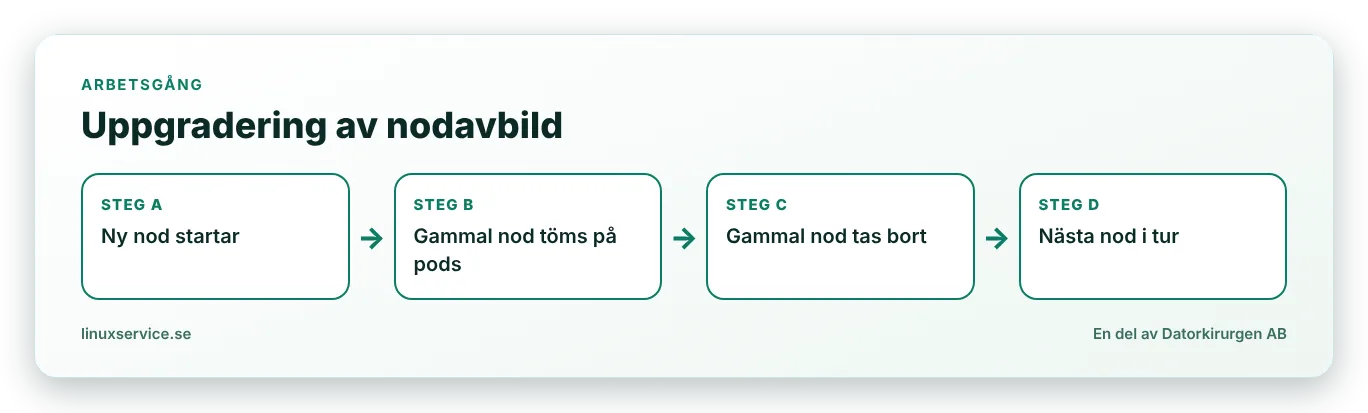
When the nodes are in place, we update them by upgrading the node image. In AKS, this takes a single command, and after that AKS replaces the nodes one at a time. In this way, the services keep responding during the update. We also set up automatic upgrades of node images in a maintenance window that suits you. As a result, the cluster receives security fixes without manual work.
Ordinary Linux servers in Azure
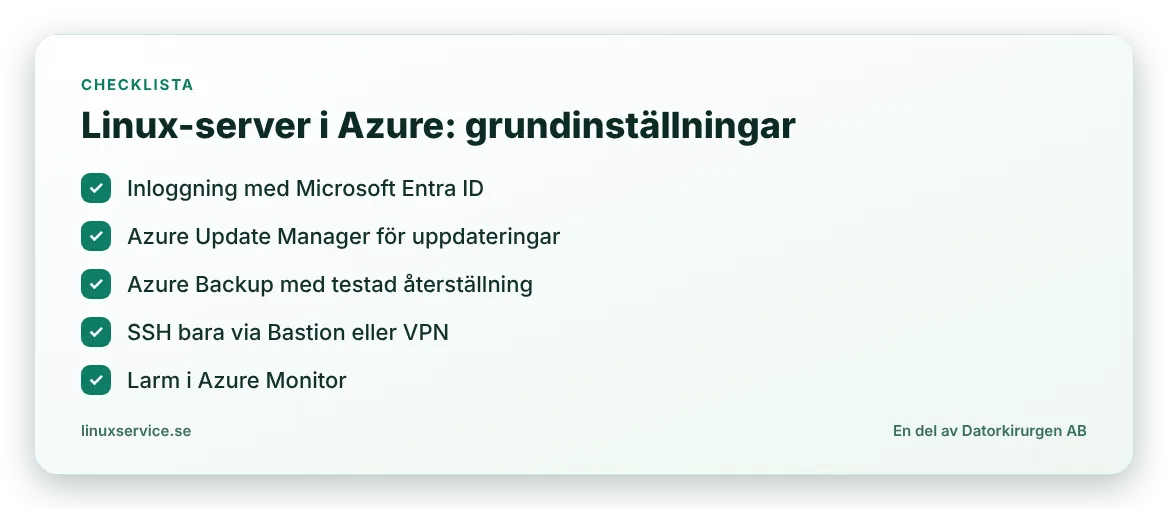
Most Linux servers in Azure, on the other hand, still run Ubuntu or RHEL. There, we set up sign-in with Microsoft Entra ID, so that you use the same accounts as in Microsoft 365. In addition, we use Azure Update Manager to control security updates. It shows which servers lack fixes, and it can install them according to a schedule. This keeps operation clear even when the servers become many.
We handle backups with Azure Backup, and we also test the restore regularly. In fact, a backup that nobody has tested is only a promise. We also check the network security groups, so that SSH is not open to the whole internet. Often Azure Bastion or a VPN is enough for administration. Feel free to also read about hardening Linux.
Costs and monitoring
Azure Monitor collects metrics and logs from both virtual servers and AKS. We set up alerts for processor, memory and disk, and also for pods that restart again and again. Such restarts are often the first sign of a memory leak in an application, and therefore we want to see them early. When the alert goes off, we can act before the users notice anything.
You can control the costs with the right size of servers and with reserved instances. We also go through disks and addresses that remain after old tests. As a result, we often find savings already in the first month.
In addition, we recommend tags on all resources in Azure. With a tag for department, project and owner, the cost report becomes understandable. Then you see immediately which system costs the most and who can answer questions about it. At the same time, it becomes easier to clean up old test environments. It is a small routine that has a big effect over time. When it comes to Microsoft 365 and Azure Virtual Desktop, we refer you to Business IT Support, who are specialists in that.
Contact Linux Service about Azure Linux
Linux Service is part of Datorkirurgen AB and works with Linux in Azure, AWS, Google and Oracle. We set up the distribution in AKS, operate Linux servers in Azure and help with security and costs. Microsoft describes the system in the documentation for Azure Linux.
Therefore, contact us if you plan a new cluster or want to change the operating system of the nodes. We carry out a review and propose a plan. We work remotely, and we are happy to meet you in Stockholm. Moreover, we can take over the ongoing operation.
Frequently asked questions about Azure Linux
Questions about the distribution
- What is Azure Linux?
- What is CBL-Mariner?
- Is the system free?
- Which package manager does the system use?
- Can you run it as an ordinary server?
- Why is the system so small?
- Are there FIPS images?
- Who provides support for the distribution?
- Does it work outside Azure?
- Which version is current?
AKS and node updates
- How do you choose the operating system for a node pool?
- What does –os-sku AzureLinux mean?
- Can you switch from Ubuntu in an existing cluster?
- How do you update node images?
- Does the update affect the services in the cluster?
- Can the upgrade happen automatically?
- What is a maintenance window in AKS?
- Why does a pod restart again and again?
- How do you set up alerts in Azure Monitor?
- How do you test a change of operating system safely?
More about Linux servers in Azure
- How do you sign in with Microsoft Entra ID on Linux?
- What does Azure Update Manager do?
- How do you test a restore from Azure Backup?
- Why should SSH not be open to the internet?
- What is Azure Bastion?
- Can you reduce our costs in Azure?
- Do you also help with Microsoft 365?
- Do you work remotely?
- What does your help cost?
- How do I contact you about Azure Linux?